


8.0 Score
My biggest gripe with Apple’s pro lineup of iPhones have been pretty simple. It was never appealing to me as a photographer and when it comes to the photography aspect, apart from the telephoto sensor, the camera shoots basically the same way as a non-pro, which is why I bought the iPhone 16 to replace my iPhone SE 2nd Generation.
But for this iPhone 18 Pro camera review, they finally addressed the need for photographic centric features and man, what a treat. This one is great, but I have my “Buts” before I ask you to buy.
iPhone 18 Pro Camera Review
Almost nothing changed in the camera

Emphasis on the “Almost” because the sensors, the camera sizes, the setup is exactly the same as the iPhone 17 Pro, which made me go “yeah, there’s no reason to upgrade.” But there are two minor but lovely additions to the new 18 Pro main camera: the new variable aperture in the hardware, which also gave us new software controls as well.
For older iPhone users, I was excited to see the some of the new software controls come to our phones, but it looks like Apple’s walled garden, isn’t going to let us, the Macrodata Refining folks be a part of the other team in the other department. (Hint: It’s a Severance Joke.)
But for those who bought the iPhone 18 Pro for Photography Reasons
Rejoice because I’d argue that this is the best iPhone Pro they have ever made, and all these while I had no reason to switch from a non Pro. Video centric features have been the brand’s focus for a long time now. It now does ProRes very well, the video experience is one of the best in its class. Even then users are resorting to BMC and other apps for efficient ProRes recording.

But when it comes to photo taking, the iPhones are great in giving good neutral and true to life colours which I prefer but it doesn’t do more than that. But this time we do get photography focused features which I am liking.
The Big improvement: Variable Aperture but not for the reasons you think
Android did it first, but they are also the ones who removed it too. I am looking at you, Samsung, Sony and Xiaomi. But now that Apple is adding it to their phone, this only means one thing, Android devices will bring it back. Mark my words.

Anyways, the iPhone 18 Pro gives users four different apertures to shoot in: f/1.48, f/1.8, f/2.8 and f/4. The best part about this is not that it can shoot at f/1.48, the best part is, it can now shoot at f/4. You see, all these years, phone makers launch a new phone with smaller and smaller aperture.

Reason was simple, smaller number aperture = more light allowed, therefore, better low light experience. So, shooting at lower aperture like f/1.6 or f/1.4 on a phone is not new. You can take your phone, google/or whatever AI you use the aperture your phone has and see what aperture your primary sensor uses, I’ll wait. It might not be 1.48 low, but it should be lower than f/2 for the main sensor. and thats pretty good.
These apertures were always in the main camera, which shoots in 24mm/28mm/35mm equivalent focal lengths. And at these focal lengths, the depth of field was not quite the feature nor the highlight. I mean it does have that depth, but it could never do the kind of depth like a full frame mirrorless camera could, because the phone sensors are smaller.
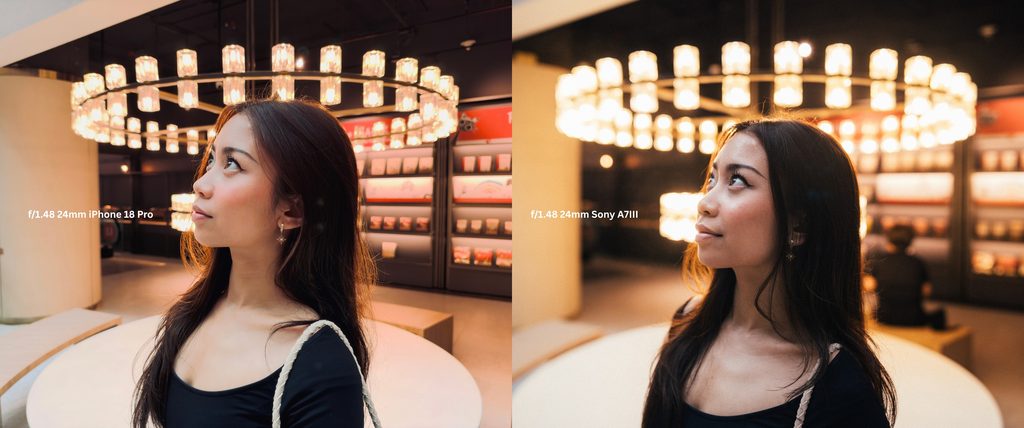
Which is why, in this photo here, you see my friend, one is taken with the iPhone and the other is taken with the A7III with 24mm f/1.4 lens, the depth of field is different. So, why have variable aperture then? It’s there, so that you dont have to shoot at f/1.4 all the time.

Below here, in this first set of example, you see the Pikachu, in all four f-stops. And all appears to look the same. Now let’s punch in, starting with the f/1.48: as you move away from the centre, your sharpness goes away and it loses its tack sharpness. Now at f/1.8: you see improvements. And then it gets even better at f/2.8 and you notice at f/4 it has a much better focus all around.

This now solves the problem where you are trying to take a photo and you need it to be tack sharp every where, its going to help you with that. you know when you try to take a close up food photo and you want all in focus but it never is? well, the f/4 is there to help you with those kinds of situations.
But if you shoot at higher apertures, you allow less light, which means, you need longer shutter speed duration. And that’s what happens here. Shooting at f/4 at night would mean, holding it for a little longer versus shooting at f/4 in broad day light would give you a slightly faster experience.
Usually, when you shoot in Auto, you dont have to worry about this but when you want to get creative, this is where, you take advantage of the pro controls.
But hey, it’s still a great addition to the iPhone 18 Pro Camera
Having this control on an iPhone, it’s the first. And I love it. I love taking photos too much and I love capturing moment and to have this level of control, even though its just four f-stops, I will gladly take it. Pair this with the manual shutter time control, I get to do things that I have never done on an iPhone before. At least not without a third party app.
I know many of you would go, just download this or that app. But hear us out, majority of the users don’t care and very few percentage users like you and I are the only one who cares about such thing. There’s a reason why Apple’s native camera app is so goated, that you can launch and take without a single hiccup. It’s that good.

So, during my time with my absolutely lovely friend, Sara. We got to take some lovely photos, we took some great photos to showcase the difference with all the four f-stops and you can see the details coming into focus as you change the aperture.

Apple also added a new control which I have been waiting for a long time. It’s the AF/MF tool. You know everytime you zoom in, your phone decides which lens it wants to shoot with and it switches lenses. But now you can lock the specific camera you want to use and enable manual focus which is genius. Which means, you can do a digital zoom with the primary sensor, keep it within the usable range and take photos with a more pronounced depth of field. And hey, it does work. You can look at both of these photos taken at f/1.48 – one at the normal 24mm f/1.48 and the other photo zoomed in at 48mm at f/1.48.
The Starburst Effect in the Variable Aperture

The next one is the starburst effect. This is fun, I will admit. You can take a look at how the strobe light is handled in these shots and take a minute or two. And then check out the pinhole shot of the sun through the tree branches. Now sure you will lose that little bit of depth, but it is great for street photography at f/4 to get those street light all starry and vibey.

Now pair that with the new film emulation the camera has, oh boy, this becomes the most unserious fun iPhone camera to shoot with. I love my slow shutter so much, the phone has a limitation of maximum 1 second. I usually don’t bring around my tripod because it can get in the way. So, I experimented with the Stark B&W + Film combo it offers. And I had some lovely photos that I really would print out.

About the Film Simulations though…

Apple claims that the grains these camera produces are computational, which means, it’s what apple thinks how a real film would have taken the picture with grains. So, you cannot control the grains. When I shoot on film, it’s not like I can control the grain anyway. So, the Stark B&W with Film combo gave this gritty, ultra-high contrast I love from those Ricoh GR or even Tri-X 400. There are other colour modes too, which I must say has its brilliance and does give you some nice effects, like you see here.

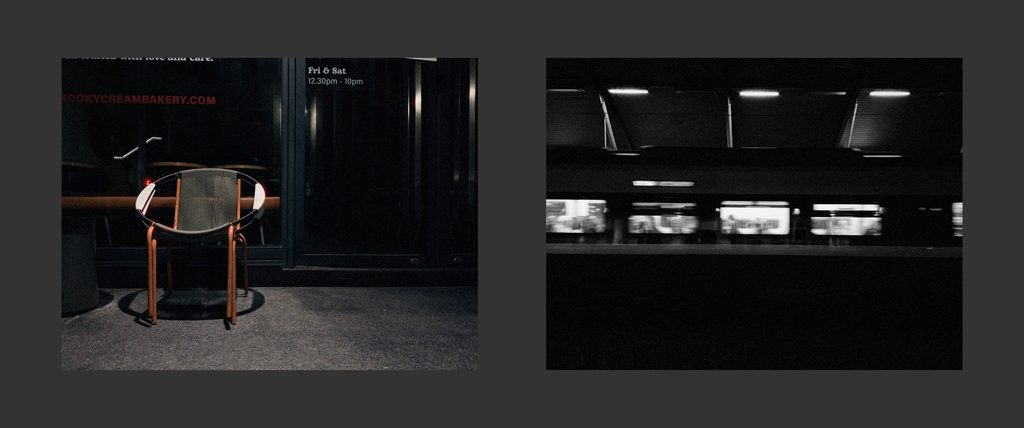
Another thing to note, most of these effects can be applied after you take the photo but shooting with these simulations live is a different experience, helps you with better composition and so on. I do have some gripes though, I’ll save that for later.
Beautify Mode: Chinese Brands can Learn a lot from Apple with Soft Skin feature
I genuinely hate every other smartphone makers and their beautify mode that makes me look like I am about to debut in the next K-Drama or C-Drama. And I am a brown Indian dude. Remember how I told you a lot of android smartphone cameras can be racist?

This is where I am going to address that. Apple’s ability to make sure that every skin tone is inclusive and isn’t discriminated is something I love and a big part of why the iPhone 16 stayed in my pocket for long. But recently, the only Android phone that I would put it on the same pedestal as the iPhone would be the Google Pixel 11 because it did so well too. Get subscribed, we will talk about that phone soon.

Now back to Apple’s Soft Skin mode. When I tried the Soft Skin control, it isn’t the kind where you get fake baby smooth skin, but it feels like a “no make up” and “with foundation to cover your acne and such”. Which is something I can get behind. It’s so subtle that you won’t notice it. But its so tastefully done. I wish other brands can take a page out of Apple’s book for this one.
So far so good ey? but what’s the Catch?
First one: No ISO Controls
Apple gave us all of these controls but the one they didn’t give us, even in Pro mode, it’s ISO control. In a recent PetaPixel interview, Apple told that they didn’t give those controls because Apple still relies on computational photography to stack the image for even exposure. So, they didn’t give it. I get it to a certain degree and third party app allows you to do it, but let’s hope the next one has the ISO control. And if it doesn’t, I am not going to be happy about it.

In broad daylight, if you want to take slow shutter, you’d require an ND filter to step it down, since there’s no ISO control. Say if you don’t have an ND filter, and you think you can trick the system with the EV control, it doesn’t really work when you are doing slow shutter in a lit environment. So, that whole marketing of how you can do slow shutter is extremely a conditional situation.
Second One: Barebones Texture Controls

You only get controls like Soft Skin, Glow, Film and Grain. And you are only allowed to choose one at a time. There’s no way to use all in one go. I dont see a reason to use all in one go but most of the time, I used grain and film. The glow is great with the Amber, which is my go to filter to shoot all the photo because it has some brilliance in the colour. Hopefully the next one, is better with ability to combine these controls.
Third: Film Modes need work and Samsung got one thing Right here
Because you have limited control and the so called film modes and colour profiles are only what Apple provides. You are limited to those choice and that’s not all, there are some profiles that creates the red-eye effect in the lighting department which is cool at times but when you want the city landscape, you will end up seeing this red sore nightmare fuel kind of image which scared me a little.
Good thing is, you can choose to adjust the intensity later but because like I said, the whole texture control is so limiting, you cant change much either. This is where I love Samsung because their phones can now import colour profiles into the camera and it is an absolute treat. Apple should take a page out of their book for this.
Fourth: MF Controls in video is crippling limited
Finally, the auto focus and manual focus control I talked about earlier, works well in photo but not in video, which is a shame. you can choose the camera you want to use, but once to hit the record button, the controls completely vanish and it is impossible to change anything until you stop recording.
I wish this changes in the next round because it would be super amazing to get these controls in video which is something I would like to see. I may not shoot ProRes but hey, I do shoot normal video and it would be awesome to have controls like this.
Hot Take: Buying the iPhone 18 Pro isn’t going to make you a great photographer
After all of this, if you think buying the iPhone 18 Pro with the new Variable Aperture is going to make you a good photographer, well, I hate to break it to you, it isn’t. You know what makes you a good photographer? Actually, going out and taking photos, experimenting, trying, failing and trying again.
For that, you don’t even need the 18 Pro, let me be honest. The iPhone 16 I have in my pocket for over a year has been nailing photos so well with the Styles, even though it may not have the same level of control as the 18 Pro. The 16 has an inferior ultrawide at 12MP but has still not stopped me from taking photos I like and love. So, my advice is, take full advantage of your current device, and learn, shoot with it and then when you are limited by the hardware, then upgrade.
As for the rest of the phone

- Everything else is simply lovely, as what you would expect from Apple. Good display for content consumption, great processor with mad amazing performance, fast charging at 45W is pretty good because in 43 mins, I got from 12 percent to 93, the battery life on the Pro lasts a day if i dont use heavily but when I do use it a lot, then yes I need to charge by 7pm.
Finally, the Pro iPhone for Photographers

I enjoyed this iPhone 18 Pro too much, I loved every second of it with the camera. But I want the 19 Pro or whatever the anniversary edition is in my pocket. Sure we have to wait a whole year to see what are the new camera improvements and such but rumor has it, that we will see the LOFIC sensor adapted into their camera. I tried it with Xiaomi and it is one to look out for. Check out our video on that – we highly recommend to understand what it means.
While the 18 Pro is kind of bare in its Pro Photography experience, it is heading in the right direction for us photographers. Think of this 18 Pro as the 17S. Next year iPhone 19 Pro and that 20th Anniversary version is going to be a game changer. I know it. I believe it.
Surprise me, Apple. I will wait for that.

For more tech, gaming, and lifestyle content, make sure to follow us on Facebook, Instagram and Twitter. Better yet, stay tuned to The Adventures of Vesper.
iPhone 18 Pro Photo Samples


