


8.5 Score
This happens to be our first ever HP laptop review we have done here and we got to check out the HP Omnibook Ultra, which is supposed to be this thin and light laptop with firepower that can put up with any kind of tasks. So, in this HP Omnibook Ultra review, we are going to share what we like and what could be better.
HP Omnibook Ultra Review
Things We loved about the Laptop
The Stunning OLED Display

OLED displays are easily the best you can find on a laptop because the rich colours and the true blacks are fantastic for content consumption, making and more. The HP Omnibook Ultra we have here comes equipped with 14-inch OLED display with 3K resolution and it doesn’t stop there. This display drives at 120Hz refresh rate and supports touch inputs too.

On top of the display, it is covered by Corning Gorilla Glass 3 which is a very nice touch. Honestly, we have come across various OLED displays in our review cycles, and this one we see here with the Omnibook is easily one of the best we have seen. Watching shows on this is a treat and you wont be disappointed. The colours are pretty spot on for me for Lightroom work even and checking out some of the edited photos to make sure that the colours are right.

You don’t have to quite worry about the peak nits brightness as it hits 1100nits with HDR and caps at 500 without HDR. We have truly come to a point in tech where the displays no longer disappoint and this one is up there. The only kicker is the lack of an anti-fingerprint coating which if you use the touchscreen a lot, you will have to carry a microfibre cloth with you almost all the time.
The Build, Form and Port Selection

The thing that blew me away is the build. Now 1.3kg is no means light light in this time and age as we have seen so many laptops that has gone under a kilogram but with the hardware you see here it offers, it surely is a light laptop. More importantly, HP did not hold back in offering a solid build quality in and out. The entire laptop construction is made out of forged aluminium and can take a beat as it does have the MIL-STD certification.

The Hinges on this laptop is solid, and for those who hope for a 180-degree fold, you wont be able to do with this one, as it only goes to about 120-130 degrees. But the finish of this laptop is simply what I call, bespoke and rich. The areas where the ports are located have the brushed finish and on the lid, you get the minimalist HP logo which I am a fan of.

For ports, this laptop is easily my favourite because it house three USB C ports, all Thunderbolt ready and a headphone/microphone combo jack on the left side. The best part about having three ports, is that you are now not limited to just connecting the charger to one side and you can use either sides. Credit where its due, HP added two dedicated charging indicators, one on each side, which again is such a simple yet amazing choice.


Rather Clean Controls and Doesn’t Feel Bloated

Once you do setup the laptop and start using it, I’d say that the laptop has limited number of bloat which I appreciate. But the one tool you need to use and experience would be the HP app itself, which handles a lot of the important controls such as audio, display, battery manager, touchpad, presence sensing, well-being, gestures and so on.
These tools are essentially important for you to customize the laptop to your own personal liking. For the most part, these are settings you could find in Windows Settings but to simplify into a tool that users can quickly change without going through the labyrinth is much appreciated.
Haptic Trackpad that’s Heavily Modifiable

The HP Omnibook Ultra uses a haptic trackpad, similarly to what you’d find on a Macbook Air or Pro. There aren’t many windows haptic trackpads in the market. And from the ones I have tried, this HP one is easily my favourite. You can adjust and control the click sensitivity, haptic click, taps, scroll and zoom and the gestures. This is easily the most heavily modifiable trackpad I have tried.
So, in my case, I chose to set it up with heavy click sensitivity so that when I use the laptop on the go, it doesn’t behave too sensitive.
Wonderful Performance from Series 3
We live in great times where we can see amazing processors powering laptops and in this case, the HP Omnibook Ultra we have here comes with Intel Core Ultra 7 356H with 32GB LPDDR5X RAM and 1TB PCIe Gen 5 SSD under the hood. My only gripe is that the RAM is soldered, but at least it’s a 32GB configuration and not lower. Using Gen 5 SSD is another big up here, especially when RAM and storage prices have been pretty steep as of late.

So, safe to say you are paying for the latest next-generation hardware. For this we did some benchmark which helps to you understand how capable this laptop is. And for me personally, I feel like Intel Series 3 got the formula right. Series 1 got the endurance right, Series 2 got the performance right and now, their third time was indeed a charm, hitting both Endurance and Performance right.
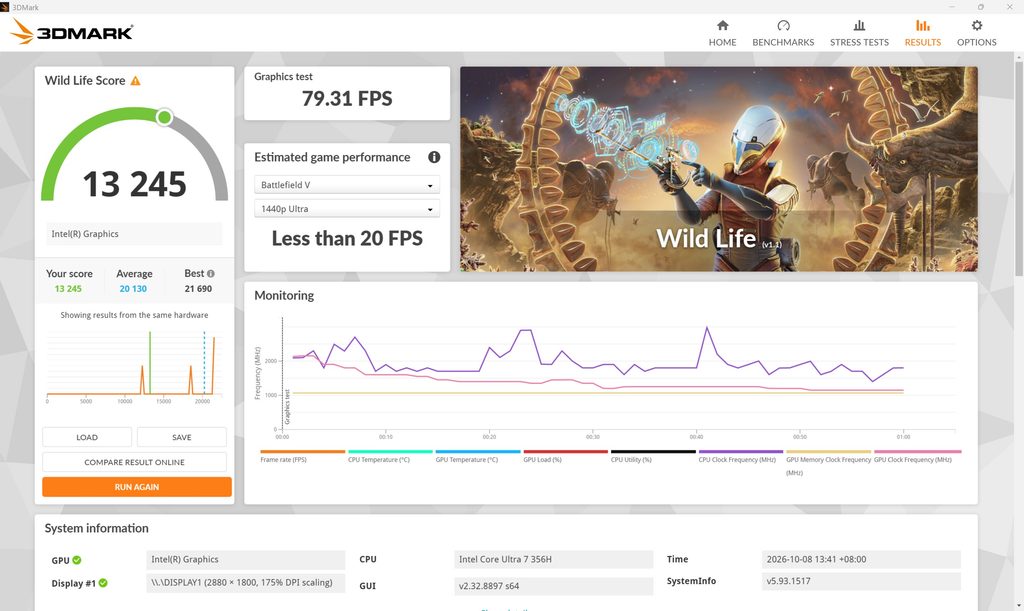


Throughout my usage, this laptop could handle everything I could throw at it. Mainly productivity tasks of course which includes Lightroom for photo editing and my usual daily work and tasks. Now, can you game on this? Eventhough it isn’t designed for that, surprisingly, you can, but do head in with the expectation of tuning your graphics at low but hey, this is far better than laptops that used to be in this profile years ago. And because of that…
It’s a Laptop I did carry with me everywhere I went
Throughout my review cycle, which spanned for three weeks, this laptop went almost everywhere I went because it was such a no brainer to use. The performance was there, the endurance was there too that I didn’t have to go around looking for chargers and I could complete most of my work and still have more to do. I’d head to a café sometime around 12pm and I would leave at 5:30pm, and the laptop would still have about 50-60% battery depending on how heavily I use.
That is good.
Quad Speakers are Decent

HP claims this laptop comes equipped with quad speakers and I must add that these speakers are decent and they are not going to blow your minds off. However, from a design stand point, HP did the genius move of making the speaker side firing, instead of downward firing. So the sides of the laptop that comes fitted with the speakers, do handle well when you put it on a good solid surface. The DTS support means very little to me but I guess its better than nothing.
Things needs to Improve
Thermals

Because it is thin and light, when you do fire up tasks that requires significant heat dissipation, that’s where the OmniBook Ultra has trouble. Now you must remember, when you get this laptop, 80% of your tasks are for productivity, content creation to a certain degree and 20% will be for things like gaming. Not the other way around, so the thermal solution they have suffice. But I do wish it had a better dissipation nonetheless.
Because the keyboard area becomes hot to the touch, making it rather uncomfortable to use on heavy load and don’t place the laptop on your lap because the heat on the bottom chassis does get hot and you should place it on a surface that doesn’t cause any harm to you.
The keyboard Experience

HP uses this rather interesting key shapes for their Omnibook Ultra. This chiclet styled keyboard is raised and has this candy like shape. And I have a bit of an not so fun experience with this. It does take a while for you to get used to it but because there is no proper gap between each keys and it has this slope in its keycaps, you are bound to hit the same key by accident.

But I did write this entire review with this laptop and there are times where I would have hit the same key twice because it was close to the other letter I am about to type.
Conclusion

Overall, the HP OmniBook Ultra which we reviewed here is a lovely laptop that really gives a very jack of all trades experience and it is a master of few, that’s for sure. I have always been a windows user through and through and it’s laptops like this I want to daily knowing that it has the ability to scale up and down depending my needs. I would consider this laptop as one I would own for sure. But it does come at a hefty price tag. The exact specification we reviewed here, goes for RM 10,699 at Harvey Norman.
It isn’t cheap but good things are not and this HP Omnibook Ultra is good. Really good. For that we give the HP Omnibook Ultra, the Silver Vesper Choice Award for 2026.

For more tech, gaming, and lifestyle content, make sure to follow us on Facebook, Instagram and Twitter. Better yet, stay tuned to The Adventures of Vesper.
